
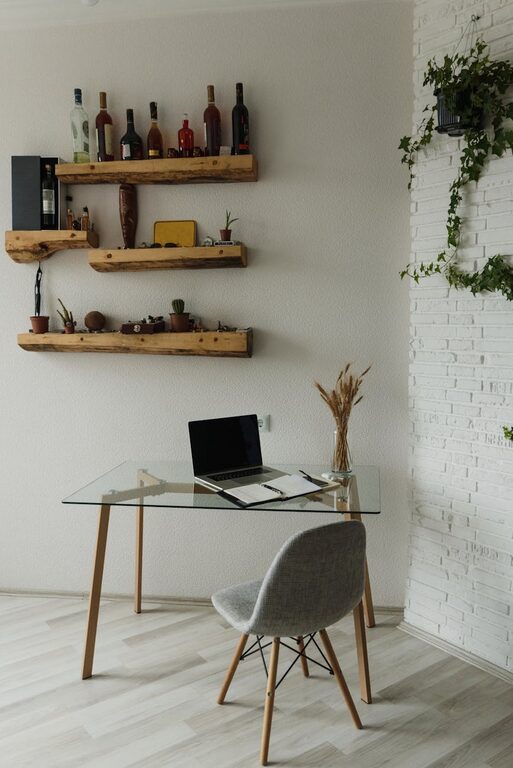
Creating a cozy and inviting home workspace can significantly boost your productivity and make working from home a more enjoyable experience. Whether you have a dedicated room or just a small corner, the way you design and organize your work area impacts your mood and efficiency throughout the day. In this post, we’ll explore practical tips and ideas to help you create a workspace that feels comfortable, inspiring, and functional.
Why a Cozy Workspace Matters
Working from home comes with many advantages, but it also poses challenges like distractions and discomfort. A workspace that feels cozy and inviting encourages focus, reduces stress, and makes you look forward to your work hours. When your environment supports both comfort and organization, your workflow improves naturally.
Choose the Right Location
The foundation of a good workspace starts with picking the right spot in your home.
– Natural Light: Position your desk near a window if possible, as natural light boosts mood and energy.
– Less Traffic: Pick a quiet area away from household distractions like TVs or busy corridors.
– Space to Move: Ensure you have enough room to stretch, shift your chair, and store essentials without feeling cramped.
Invest in Comfortable Furniture
Comfort plays a big role in preventing fatigue and discomfort during long work hours.
– Ergonomic Chair: Select a chair that supports your back and encourages good posture. Adjustable height and lumbar support are key features.
– Functional Desk: Choose a desk that fits your space and workflow. Consider one with storage options or space for multiple monitors if needed.
– Footrest & Accessories: Adding a footrest or cushioned mat can further improve comfort, especially if you stand at your desk sometimes.
Use Soothing Colors and Personal Touches
Colors affect mood and concentration. Opt for calming shades that make the space feel warm without being distracting.
– Soft Neutrals and Pastels: Light blues, greens, beige, or soft grays often create a peaceful atmosphere.
– Art and Décor: Personalize your workspace with artwork, photos, or plants that make you smile.
– Textiles: Add soft cushions, a cozy throw blanket, or a small rug to add warmth and texture.
Organize with Purpose
Clutter can hinder focus and creativity. Keeping your workspace tidy helps your mind stay clear.
– Desk Organizers: Use trays, holders, or drawers to store pens, papers, and office supplies neatly.
– Cable Management: Use clips or sleeves to keep cords untangled and out of sight.
– File Storage: Consider shelves or filing cabinets to organize documents and keep the desktop free for work.
Incorporate Proper Lighting
Lighting affects both your comfort and how well you can see your work.
– Layer Lighting: Combine overhead lights with a desk lamp to reduce eye strain.
– Adjustable Lamps: A lamp with adjustable brightness and direction helps you focus while avoiding glare.
– Warm Light: Choose bulbs with warmer tones for a relaxing feel, especially for late work sessions.
Bring in Nature
Adding natural elements can increase feelings of well-being and reduce stress.
– Indoor Plants: Small potted plants or succulents are easy to care for and brighten up the space.
– Natural Materials: Use wood, stone, or woven baskets to add texture and a natural vibe.
– Fresh Air: If possible, keep a window open occasionally for fresh air circulation.
Create a Routine and Boundaries
A well-designed workspace helps you create mental boundaries between work and home life.
– Set Specific Work Hours: Use your workspace only for work during certain hours to build a routine.
– Daily Reset: Spend a few minutes at the end of your day tidying the space to signal closure.
– Limit Non-Work Items: Avoid piling personal items on your desk to keep your focus clear.
Enhance with Technology
Technology can improve efficiency but choose what supports your needs without causing clutter.
– Noise-Canceling Headphones: Helpful for concentration if your home is noisy.
– Smart Assistants: Devices that manage calendars or reminders can keep you organized.
– Wireless Accessories: Minimize cable clutter with wireless keyboards, mice, and chargers.
Comfort Breaks and Ergonomics
Don’t forget to care for your body during work hours.
– Stretch and Move: Take short stretches or walk breaks every hour to reduce stiffness.
– Hydration Station: Keep water nearby so you stay refreshed.
– Eye Care: Follow the 20-20-20 rule—every 20 minutes, look at something 20 feet away for 20 seconds.
Final Thoughts
Crafting a cozy and inviting home workspace is about balancing comfort, aesthetics, and function. The goal is a space where you feel good physically and mentally, which directly supports your productivity and well-being. By applying these tips, you can turn your work area into a favorite spot in your home—making remote work more effective and enjoyable.
Remember, your workspace should evolve with your needs. Stay flexible, keep it tidy, and let your personal style shine!